A Foundry VTT module to import characters created with SecondStep into the Earthdawn 4th Edition game system in Foundry VTT.
The module currently is built to only work with the Earthdawn 4th Edition Player's Guide and the Earthdawn 4th Edition Gamemaster's Guide (for Thread Items) which have to be activated in your game. This is because it contains all talents/skills/disciplines/namegivers/equipment/thread items and to avoid licensing issues.
It is tested with Second Step: Stable version (1β11.1)
- After installing and activating the module in your game, you should see a button ("Import 2ndStep") in the Actors Directory of your sidebar.
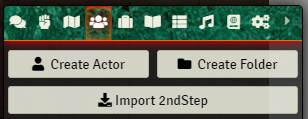
-
Click the button: a dialog opens, asking you to select a file. Choose the *.json file you downloaded from SecondStep, and click Select File.
-
The module then does its magic, and you should see a new character sheet open on the screen.
-
Check if everything worked out and have a look in the Journals Directory in the sidetab for log files (in the folder Steps2Foundry).

(yes, I promise I will change the background color some day)
- Done!
- The module receives items in Foundry VTT from the Earthdawn 4th Edition Player's Guide and the Earthdawn 4th Edition Gamemaster's Guide (for Thread Items). Since there are no fixed naming conventions for these items (especially when it comes to things like Knowledge/Artisan Skills and the such), the importer might not find all listed items in the file. To check and edit these items, a log file is created as a Journal Entry in the folder Steps2Foundry. After importing, control this log to edit and finalize your character creation and add all missing items.
- The "Log" field from SecondStep is imported as the character's personal Journal Entry. This is found in the folder Steps2Foundry as well.
- If your SecondStep file has character art/an image, it can be automatically loaded. For this to be possible, the image has to come frome a valid absolute URL, that is, a publicly available internet site (the url you get when right-clicking an online image and select an option like "Show Image in New Tab").
- This is somewhat of a beta version. There might be stuff not working right now. If you find this stuff, please open an issue here on github and I will try to take care of it as soon as possible.
- The module is currently only tested with files generated from the online version of SecondStep. Feel free to try it with the standalone application and let me know how it goes.
- The character sheet that opens up will flicker for a second. That is because the sheet has to be closed and re-opened for some changes to take effect. I'm trying to find another solution to this, but this is currently the only working possibility, sorry.
- If you don't need to import any more characters, you can just disable the module in the settings, this way the import button disappears and doesn't clutter your UI.
I hope this helps, and don't hesitate to contact me with questions.
You are great