

Home Assistant dashboard card displaying heat pump parameters
✨ Install via HACS

- Download
Source codefile from the [Releases][releases] page - Unzip and upload all stuff out of dist folder to
/www/community/lovelace-heat-pump-card(via Samba, File Editor, SSH, etc.) - Visit the Resources page in your Home Assistant install and add
/hacsfiles/lovelace-heat-pump-card/heat-pump-card.jsas a JavaScript Module. - Refresh your browser

| Name | Type | Requirement | Description |
|---|---|---|---|
| title | string | optional | Title of the card, if empty no title is displayed |
| heatingPumpType | string | optional | Chose between three types of heat pump: "A2W" (Air to Water), "W2W" (Water to Water) and "G2W" (Ground to Water), if not set, A2W is used as default |
| temperatureGroundWaterIn | object | optional | Used for "W2W" and "G2W" heat pumps for input temerature |
| temperatureGroundWaterOut | object | optional | Used for "W2W" and "G2W" heat pumps for output temerature |
| heatingPumpStatusOnOff | object | Required | if heating pump is off, power symbol is displayed |
| heatingPumpHotWaterMode | object | optional | Hot Water Mode, when on, faucet symbol is displayed |
| heatingPumpHeatingMode | object | Required | if Heating Mode is on, radiator symbol is displayed |
| heatingPumpCoolingMode | object | optional | in Cooling Mode, the cooling symbol is displayed |
| heatingPumpPartyMode | object | optional | in Party Mode the drinking glass symbol and ambientTemperatureParty (when set) is displayed |
| heatingPumpEnergySaveMode | object | optional | in Energy Saving Mode the piggybank symbol and ambientTemperatureReduced (when set) is displayed |
| heatingPumpNightMode | object | optional | Night Mode switches between sun and moon symbol |
| warning | object | optional | A warning symbol is displayed, when result is on |
| error | object | optional | A error symbol is displayed, when result is on |
| defrostMode | object | optional | A defrost mode symbol is displayed, when result is on |
| outdoorTemperature | object | optional | Outdoor Temperature |
| ambientTemperatureNormal | object | Required | Ambient Temperature normal |
| ambientTemperatureReduced | object | optional | Ambient Temperature reduced (used when heatingPumpEnergySaveMode is on) |
| ambientTemperatureParty | object | optional | Ambient Temperature Party (used when heatingPumpPartyMode is on) |
| supplyTemperature | object | optional | Supply Temperature |
| hpRunning | object | Required | when Primary Source is active, the fan animation is running |
| compressorRunning | object | Required | Binary sensor which detects if Compressor is running |
| circulatingPumpRunning | object | optional | Binary sensor which detects if Circulating Pump is running, if not defined, circulating pump is not displayed |
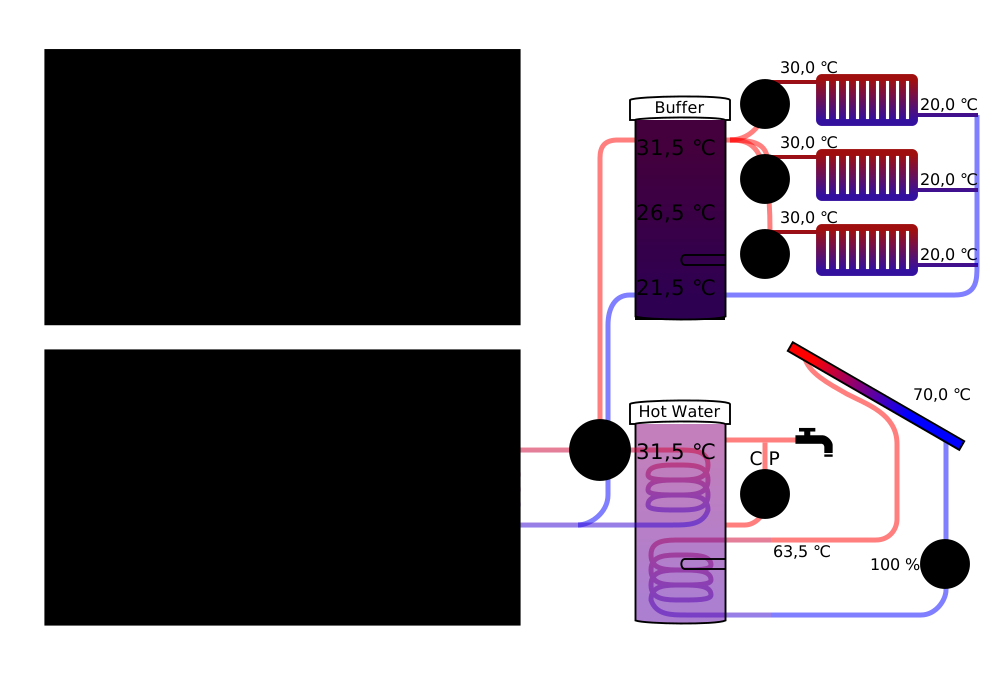
| tankTempHPUp | object | optional | Buffer Temperature up, displayed in buffer tank and fill upper color is set between blue (≦ 20 ℃) and red (≧ 60 ℃). If not set, buffer tank is not displayed! |
| tankTempHPMiddle | object | optional | Buffer Temperature middle, displayed in buffer tank and middle fill color is set between blue (≦ 20 ℃) and red (≧ 60 ℃), if not set, for calculating fill color above temperature - 5 ℃ is used |
| tankTempHPDown | object | optional | Buffer Temperature down, displayed in buffer tank and lower fill color is set between blue (≦ 20 ℃) and red (≧ 60 ℃), if not set, for calculating fill color above temperature - 5 ℃ is used |
| tankTempWWUp | object | optional | Hot Water Buffer Temperature up, displayed in buffer tank and fill upper color is set between blue (≦ 20 ℃) and red (≧ 60 ℃). If not set, hot water path and tank is not displayed! |
| tankTempWWMiddle | object | optional | Hot Water Buffer Temperature middle, displayed in buffer tank and middle fill color is set between blue (≦ 20 ℃) and red (≧ 60 ℃), if not set, for calculating fill color above temperature - 5 ℃ is used |
| tankTempWWDown | object | optional | Hot Water Buffer Temperature down, displayed in buffer tank and lower fill color is set between blue (≦ 20 ℃) and red (≧ 60 ℃), if not set, for calculating fill color above temperature - 5 ℃ is used |
| heatingCircuitType1 | string | optional | Type of first Heating Circuit, "off", "underfloor" or "radiator" default is "off" the circuit is hidden in this case |
| heatingCircuitPumpRunning | object | optional | Binary sensor which detects if Heating Circuit Pump is running, if not defined, heating circuite pump is not displayed |
| supplyTemperatureHeating | object | optional | Supply Temperature Heating, when not defined heating pipe is not displayed |
| refluxTemperatureHeating | object | optional | Reflux Temperature Heating |
| heatingCircuitType2 | string | optional | Type of second Heating Circuit, "off", "underfloor" or "radiator" default is "off" the circuit is hidden in this case |
| heatingCircuitPumpRunning2 | object | optional | Binary sensor which detects if Heating Circuit Pump is running, if not defined, heating circuite pump is not displayed |
| supplyTemperatureHeating2 | object | optional | Supply Temperature Heating, when not defined heating pipe is not displayed |
| refluxTemperatureHeating2 | object | optional | Reflux Temperature Heating |
| heatingCircuitType3 | string | optional | Type of third Heating Circuit, "off", "underfloor" or "radiator" default is "off" the circuit is hidden in this case |
| heatingCircuitPumpRunning3 | object | optional | Binary sensor which detects if Heating Circuit Pump is running, if not defined, heating circuite pump is not displayed |
| supplyTemperatureHeating3 | object | optional | Supply Temperature Heating, when not defined heating pipe is not displayed |
| refluxTemperatureHeating3 | object | optional | Reflux Temperature Heating |
| evaporatorPressure | object | optional | Evaporator Pressure |
| evaporatorTemperature | object | optional | Evaporator Temperature |
| condenserPressure | object | optional | Condenser Pressure |
| condenserTemperature | object | optional | Condenser Temperature |
| expansionValveOpening | object | optional | Opening Expansion Valve |
| wwHeatingValve | object | optional | Heating/Hot Water Valve |
| heaterRodWW | object | optional | Heater Rod Hot Water is active and displayed in the buffer tank |
| heaterRodHP | object | optional | Heater Rod Heating is active and displayed in the buffer tank |
| heaterRodLevel1 | object | optional | Heater Rod is using Level 1, color is set to orange |
| heaterRodLevel2 | object | optional | Heater Rod is using Level 2, color is set to red |
| linkDetails | string | Required | Link to details page |
| linkSettings | string | Required | Link to settings page |
This are my settings for Viessmann Vitocal 350 heating pump with Vitotronic 200 controller, most stuff is provided by Vcontrol add-on (everything with mosquitto_mqtt_broker in the name),
additional binary_sensors I've created as helper to translate the heat pump modes to universal values. Otherwise a translation for each different heat pump needed to be integrated.
- type: custom:heat-pump-card
  title: Wärmepumpe
  heatingPumpType: A2W
  temperatureGroundWaterIn: ""
  temperatureGroundWaterOut: ""
  heatingPumpStatusOnOff: binary_sensor.heating_pump_status_on_off
  heatingPumpHotWaterMode: binary_sensor.heating_pump_hot_water_mode
  heatingPumpHeatingMode: binary_sensor.heating_pump_heating_mode
  heatingPumpCoolingMode: binary_sensor.heating_pump_cooling_mode
  heatingPumpPartyMode: binary_sensor.heating_pump_party_mode
  heatingPumpEnergySaveMode: binary_sensor.heating_pump_energy_save_mode
  heatingPumpNightMode: binary_sensor.heating_pump_night_mode
  warning: ""
  error: ""
  defrostMode: ""
  outdoorTemperature: sensor.mosquitto_broker_aussentemperatur
  ambientTemperatureNormal: number.mosquitto_broker_raumsolltemperatur_normal
  ambientTemperatureReduced: number.mosquitto_broker_raumsolltemperatur_reduziert
  ambientTemperatureParty: number.mosquitto_broker_raumsolltemperatur_party
  supplyTemperature: sensor.mosquitto_broker_anlagenvorlauftemperatur
  hpRunning: binary_sensor.mosquitto_broker_status_primaerquelle
  compressorRunning: binary_sensor.mosquitto_broker_status_verdichter
  circulatingPumpRunning: binary_sensor.mosquitto_broker_warmwasser_zirkulationspumpe
  tankTempHPUp: sensor.mosquitto_broker_pufferspeichertemperatur
  tankTempHPMiddle: ""
  tankTempHPDown: ""
  tankTempWWUp: sensor.mosquitto_broker_warmwassertemperatur_oben
  tankTempWWMiddle: ""
  tankTempWWDown: ""
  heatingCircuitType1: underfloor
  heatingCircuitPumpRunning: binary_sensor.mosquitto_broker_heizkreispumpe
  supplyTemperatureHeating: sensor.mosquitto_broker_vorlauftemperatur_heizkreis
  refluxTemperatureHeating: ""
  heatingCircuitType2: "off"
  heatingCircuitPumpRunning2: ""
  supplyTemperatureHeating2: ""
  refluxTemperatureHeating2: ""
  heatingCircuitType3: "off"
  heatingCircuitPumpRunning3: ""
  supplyTemperatureHeating3: ""
  refluxTemperatureHeating3: ""
  evaporatorPressure: sensor.mosquitto_broker_druck_im_verdampfer
  evaporatorTemperature: sensor.mosquitto_broker_temperatur_verdampfer
  condenserPressure: sensor.mosquitto_broker_druck_im_kondensator
  condenserTemperature: ""
  expansionValveOpening: ""
  wwHeatingValve: binary_sensor.mosquitto_broker_status_warmwasserventil
  heaterRodWW: switch.mosquitto_broker_freigabe_elektroheizung_fuer_ww_bereitung
  heaterRodHP: switch.mosquitto_broker_freigabe_heizen_mit_elektro
  heaterRodLevel1: binary_sensor.mosquitto_broker_status_heizstab_stufe_1
  heaterRodLevel2: binary_sensor.mosquitto_broker_status_heizstab_stufe_2
  linkDetails: /lovelace/hp-details
  linkSettings: /lovelace/hp-settings
Contributions are welcome! Submit pull requests or open issues for bugs, enhancements, or feature requests. For translations to unsupported languages, you can use en.json as template.